For: Owner, Admin10 min
How do I set up SMS reminders?
Connect your own Twilio account so members get a text before their booking.
Step 1: In the Twilio console, copy your Account SID (it starts with AC), your Auth Token, and your Twilio phone number.
Step 2: In BookASpace open Club settings from the menu (☰) and select the Advanced tab. Find SMS reminders (Twilio).
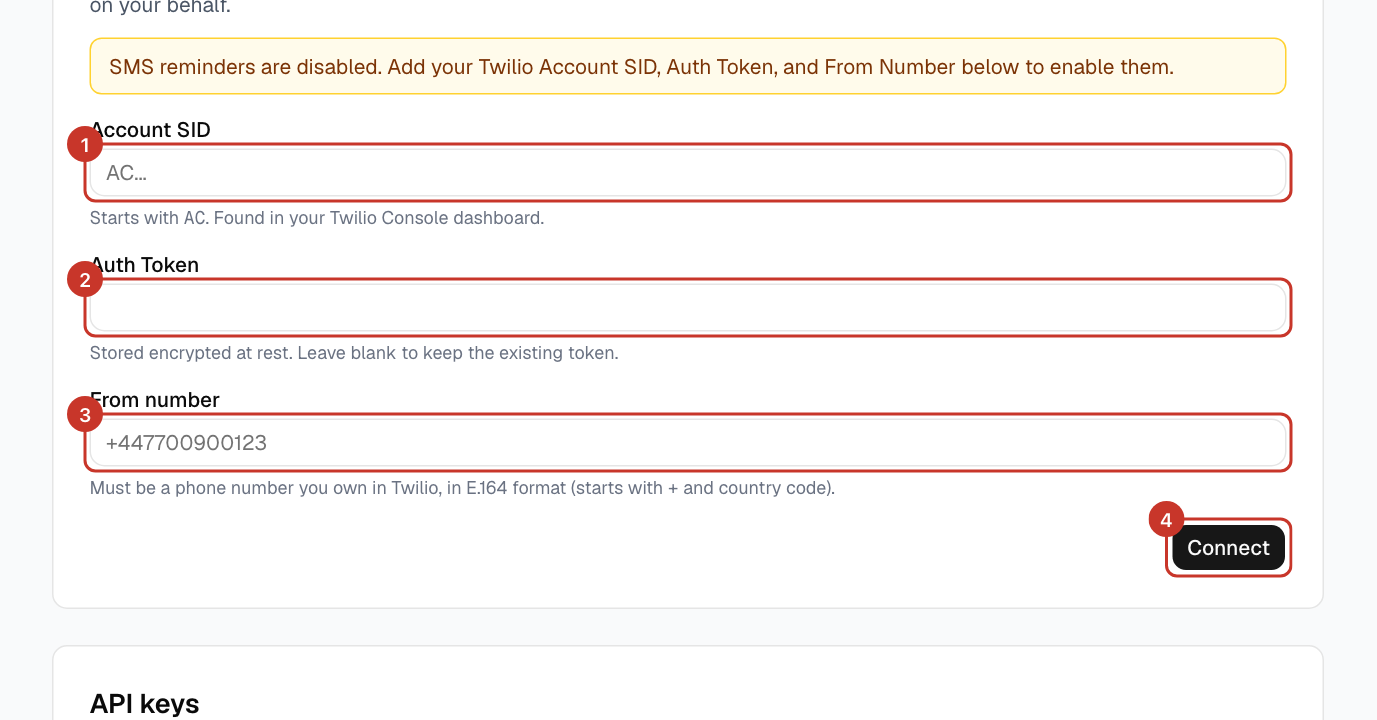
Step 3: Enter the Account SID, Auth Token and From number. The number must be in international format, starting with
+.Step 4: Select Connect. The yellow notice saying reminders are disabled goes away. The token is stored encrypted.
What happens next
- Members with a phone number on their profile get one text an hour before their booking, with a link to cancel if they cannot make it.
- If check-in is on and a booking is cancelled because nobody checked in, the members get a text about that too.
- Members add their number here: How do I update my details?.
If something goes wrong
- Members are not getting texts.
- Check they have a phone number on their profile in international format, and that the Twilio credentials are correct and the account has credit.
- Do I need to re-enter the Auth Token to change another field?
- No. Leave it blank to keep the existing token.