For: Owner, Admin3 min
How do I set up a league night?
Book the same tables every week, fortnight or month in one go.
Step 1: On Make a booking, select New booking and tick the tables you need, for example Tables 1 and 2. Set the Start and End for the first night.
Step 2: Give it a Title (optional) such as League Snooker. The title is visible to all members on the calendar, even if names are hidden.
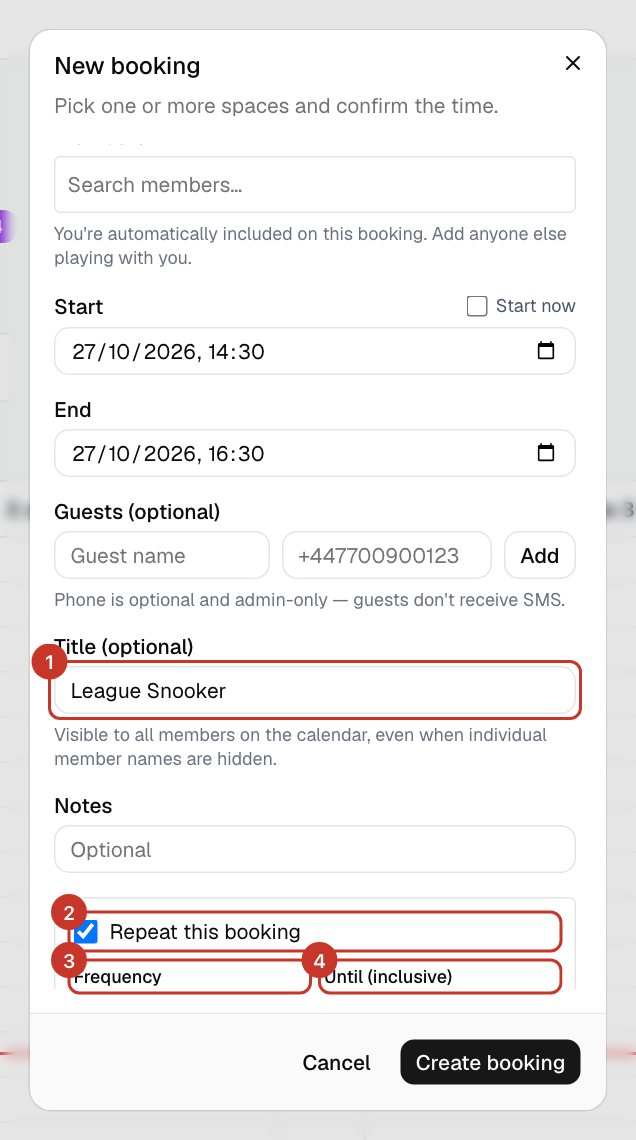
Step 3: Tick Repeat this booking and choose Frequency: Weekly, Fortnightly or Monthly.
Step 4: Set Until (inclusive) to the last date. A series can run for at most 12 months. Select Create booking.
What happens next
- You will see Series created with the number of bookings made.
- Members you added are emailed that they were added to the bookings in the series.
- To change or cancel later, open any booking in the series and choose its scope — only this booking, this and future ones, or the whole series.
If something goes wrong
- Guests are missing from the series.
- Guests are not carried into repeating bookings. Add them to individual bookings.
- It says Series can’t be created.
- Every date in the series has to be free, so one clash (an existing booking, a closure or a time outside opening hours) stops the whole series. The message lists the problem dates. Move or cancel the clashing booking, or shorten the range, and try again.
- It says the series produces too many occurrences.
- A series can have at most 60 bookings. Shorten the Until (inclusive) date or use a less frequent option.
- Can members do this too?
- Yes, any member can repeat a booking, within the club’s booking-ahead limit. League nights are usually set up by admins.